IO.flow®
EasyGraph also supports datalogging using the VSE IO.flow® converter connected with an IO-Link USB master to the PC.

Overview
The IO-Link USB master is intended for portable setup, commissioning, and analysis of IO-Link based flowmeter installations. In combination with IO.flow, EasyGraph can stream the live process data to the PC and adjust the most common working parameters.
Connection
The IO.flow converter supports the following input configuration:
- Single or dual channel quadrature (HTL level 0..24 V)
- Frequency ( Flowrate)
- Pulse Count ( Volume)
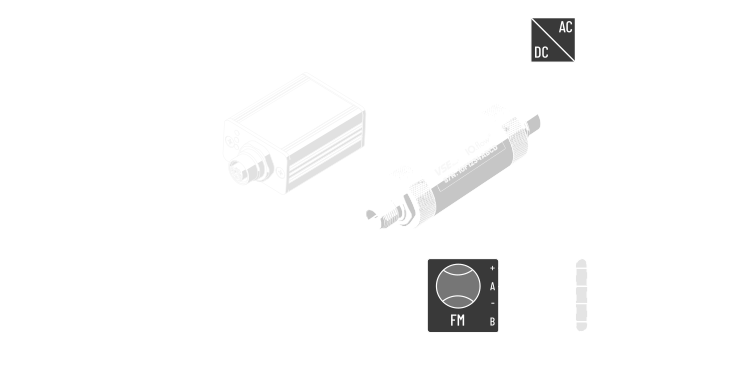
Connect the female M12 side of IO.flow to the IO-Link master, the male M12 side to the flowmeter, and then connect the USB master to the PC using Mini-USB.
Activation
If you are connecting to an IO-Link master for the first time, follow License Activation — Online Activation. The additional-devices license is validated online on each program start.
Device menu
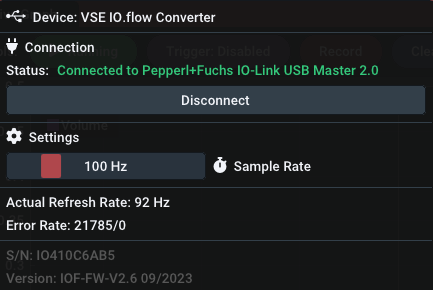
Connection behavior
IO.flow setups are connected using the Auto-Connect button in EasyGraph. After a successful connection, verify that the live stream is active before changing parameters.
Settings
Sample rate : The sample rate controls how often the value is refreshed in the live graph or value panel. The setting can be adjusted from 30 Hz up to roughly 500 Hz, matching the practical limit of the USB master refresh path.
Hint: Higher sample rates are not recommended as this increases jitter.
Parameterization scope
EasyGraph supports changing the most common IO.flow parameters directly in the device properties. EasyGraph covers the basic operating parameters. For remaining advanced options, use other tools to change parameters directly.
V_Filter: five selectable live-graph filter levels1V_EncProp: Encoder properties: flowmeter channel count (2ch/1ch)V_Unit: choose betweenHz | pulses,l/min | landkg/min | kgV_IPFV_KFactorV_QmaxV_Densityinkg/m^3V_Linearizationenabled or disabled
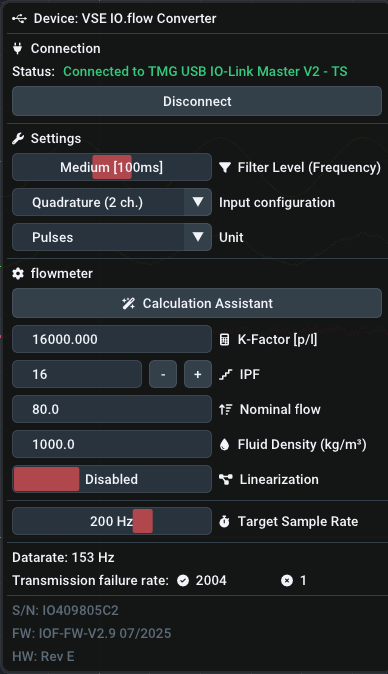
The Calculation Assistant can be used to load VSE flowmeter data from the embedded flowmeter database. That helps populate K-factor and IPF values based on nominal values.
Math settings combined with IO.flow units
The IO.flow's unit and density settings are used on-device and are separate from the channel math's settings. Those math settings are applied to the process value that comes from the device.
-
Filter Setting Rise Time [ms] Visualization Disabled8 Dynamic20 Smooth150 Heavy800 Extreme2000